A file shelf for Windows.
Drag a file onto the notch at the top of your screen and it waits there. Get the other window ready, then drag it back out: into an email, a chat, a folder, any app. And scan a code with your phone, and its photos land on the Shelf too.
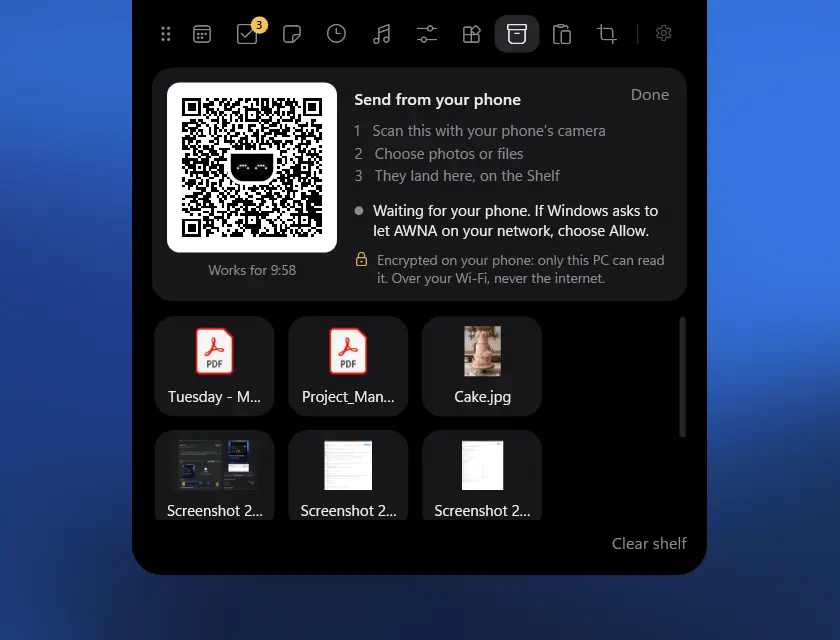
How the Shelf works
Dragging a file somewhere means having both places on screen at once. A shelf takes the first half off your hands: drop the file, then take your time finding where it's going.
- Drag files from File Explorer, the desktop or your browser onto the notch. It opens: drop them on Shelf.
- Whenever you're ready, open the notch and drag them out, into an email, a chat, a folder or any app. Select several to take them all at once.
They wait there, with a preview of each picture, for as long as you like: restarting doesn't clear them. Your files stay where they are, too. The Shelf remembers where each one is without moving or copying it, and if you rename a file or move it on the same drive, it still finds it.
Your phone, both ways
The Shelf is also the way between your phone and your PC. Scan a code with your phone's camera: there's no app to install, no cable and no account.
From your phone
- On the Shelf, press From your phone. A code appears.
- Scan it with your phone's camera, and choose photos or files.
- They land on the Shelf as they arrive, ready to drag anywhere.
To your phone
- On the Shelf, press To your phone, and scan the code.
- Tick what you want to send.
- It's on your phone, to save.
Everything goes straight across your own Wi-Fi, encrypted with a key only the code carries, and never through the internet. A code works for ten minutes and for one phone, and Done ends it sooner. If Windows asks whether to let AWNA on your network, choose Allow. Sending to and from your phone comes with a key.
Ways to use it
-
Attachments from all over
Gather what an email needs from different folders as you come across them, then drag them into the message together.
-
Screenshots, ready to share
Screenshots you take with AWNA, long scrolling ones included, land on the Shelf. Drag one straight into Slack, Teams or a reply.
-
Uploading to a website
Most upload pages take a dropped file. Drag it from the Shelf onto the page instead of hunting for it through Browse.
-
For later today
Park the file you'll need for this afternoon's call, so it's one hover away rather than three folders down.
-
Photos into a document
Scan the code, pick the photos on your phone, and drag them from the Shelf into Word, an email or a post.
With a key -
A ticket onto your phone
Tick the boarding pass or the concert ticket on the Shelf, scan the code, and it's on your phone before you leave.
With a key
What else it does
- Things that aren't files yet are kept as copies, such as a picture dragged from a web page or an attachment from Outlook, in the Shelf's own folder. Removing one sends it to the Recycle Bin.
- Sketches from the doodle pad go there when you save them.
- Find things on it by searching for a file's name, and make the previews bigger or smaller. Click an item to open it. Right-click one to show it in its folder, crop or rotate it if it's a picture, or take it off the Shelf.
Doesn't Windows do this already?
Not quite. Clipboard history (Win V) keeps text and pictures you've copied, not files, and empties when you restart, apart from anything you've pinned. Windows 11 had a Drag Tray for a while, which appeared when you dragged a file so you could share it to an app, but it didn't keep files for later, and Microsoft took it out in August 2026.
Other shelves for Windows
Dropshelf, Holdem and Tokri are shelves for Windows too, if the shelf is all you're after. AWNA's has your phone built in, and comes with nine more tabs at the top of your screen: your calendar, tasks, music, the last 50 things you copied, screenshots and more.
What it costs
The Shelf is free for good, along with Today, Tasks and Music. A key, £8 once, unlocks the rest of AWNA, sending to and from your phone included, on up to three PCs. No subscription, and no account.
A shelf at the top of your screen, and a way in from your phone. Windows 10 and 11, no admin rights, nothing uploaded.


Checked 27 October 2026. Coming from a Mac notch app? Here's what AWNA has of each.